Tampilkan postingan dengan label format. Tampilkan semua postingan

Rabu, 04 Mei 2016


Hello sometimes you can stumble on a word document with thousands of pages. You might want to have a clue of what the content is by getting through the images with little reading. I will share with you one very simple way to do that. No software is required
Step one
copy the document to any folder of your choice
step two
rename the folder changing the .doc at the end to .zip
For example i will change
gths.doc to gths.zip
In this step, we have converted the file to a zip file
Step three
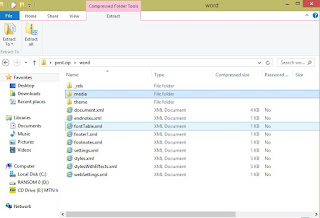

Open the the zip file and search the folder
word
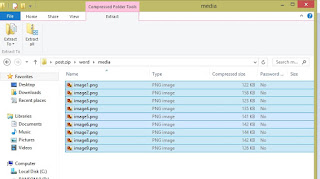
open media and copy the images to a desired folder and view with your favorite image viewer.
Read More..

Jumat, 11 Maret 2016

Hello I’m back. Still with my favorite guy ‘Command Prompt’ let’s call him ‘CMD’ we’re going to get something new in mind. Usually when we try to format a disk we get some errors like windows can’t format or … even though the device is not opened .
With CMD we can force the format process. All we have to do is :
Open Cmd, then type in format followed by the letter corresponding to your drive for example mind is J


Press the ‘Enter Key’ again and wait till the process is done . Rename your device and that’s it.
Thanks


Read More..