Tampilkan postingan dengan label website. Tampilkan semua postingan

Minggu, 22 Mei 2016

Getting your website on the top pages of search engines like yahoo,bing and google is not as easy as  we might think. Most website owners always end up missing out their target as they try to improve on their ranking and search engine results. Here are some of the reasons,why your attempt to improve SEO on your website is not working
1. Lack of long term vision

Many SEO action strategies are applicable for a short period for instance six months to one year. Many clients think that after such a long of period high rankings, there site won’t require any kind of SEO work done. The SEO strategy must create "value" as long as your internet business is operational. Hence, it becomes crucial to know whether you’re employing a short term SEO strategy or a long term SEO strategy.

2. No Real Strategy

The fact is, most SEO experts on the web today dont really know what they’re doing to guarantee your rankings in major search networks. The sad part is, most businesses think that SEO isn’t their cup of tea. As a result, the odds are high that you might be shooting in the dark and expecting to hit your SEO goals at some point. It’s really important that you learn at least the basics of what SEO is all about and know what your SEO expert is doing in order to improve your website rankings.

3. Poor Link Strategy
Most SEO experts end up building random back links to your site that might help you rank your site for a short while but after some time, you might see totally opposite results. In order to build a powerful link reputation, proper alignment becomes very essential. This includes aligning your SEO plan with fresh link variables that are consistent, relevant, diverse, and progressive.

4. Copy the competitor’s site

Many action plans in SEO try to copy what other competitors are doing to rank their site. As a result, many businesses think too much of their competitors & don’t pay any attention to the actual "value" they’re creating through their site.  A SEO strategy which only focuses on chasing the competition is very likely to fall.

5. Unreal expectations

Many SEO action strategies make huge claims & guarantee rankings in top search engines. This attracts most of the online businesses. However, one thing you need to consider when purchasing such services is do these services really guarantee you long term rankings? You must also know their SEO strategy and whether or not it’ll have any negative impact on your site.

6. Bigger is not always better

Many SEO action strategies attract customers by targeting maximum blogs, and social communities during their link building process. But, one think you need to remember is that it is impossible to target numerous communities all at once manually. Hence, it is important that you concentrate on the actual value & interaction instead of the numbers.

Read More..

Sabtu, 14 Mei 2016

Facebook Video Ad Features CTA, Metrics,  Button Audience, Objective full guide today we are sharing with you, Facebook announced that they will be soon going to launch new video advertising for advertisers which consists of post-view CTA buttons, trying to build targeted audience of people which have watched your clips which will be helpful in later targeting and expanded video metrics. Advertisers and business persons are really excited about the possibilities. In this article, we are going to talk about what actually has changed and how you can get advantage or benefit from it.

Video Views Objective

Whenever you create a new campaign for advertisement or promotion, you will have the option of choosing the clips views objective option. You can easily find out this iption within both power editor as well as in campaign manager.

Dont Miss - How Should Pay For My Facebook Ads oCPM or CPC


Facebook Video ad Views Objective image photo


And also ad create tool as well mentioned in the snapshot shown below:

Facebook Video Views ads Objective image photo

Dont Miss - How To Get More From Boost Post of Facebook with Target


So by making such kind of selection, It will be better for Facebook to optimize video views, which means that Facebook will show your advertisement to those people who might be interested to watch your clip.
Video View is  defined by Facebook as viewing your clip for just minimum of only three seconds. Now it depends upon you whether you want to included sound in it or want it without sound (autoplay). It will not allow the users to click on the videos in order to play or view the clip.

Create a Video Ad

From the ccreative step of ad creation in power editor, users have the opportunity to choose the posts which they want to promote as video ads. For more check out the screenshot given below:

Facebook Video ads Views Objective image photo

Dont Miss - Difference between Website vs Facebook Ad Clicks with CPC CPR


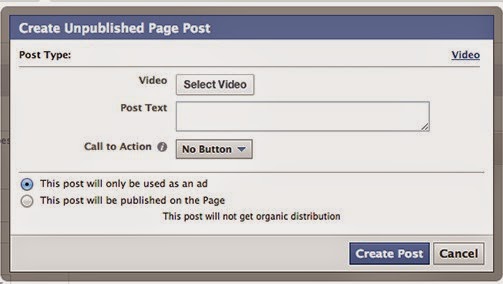
Now you will then realize or notice that Facebook will only list eligible the Facebook posts which utilized Facebook video. You might also be interested in creating an unpublished clips post which doesn’t seem to be appearing in the News Feeds organically. In order to that, you will need to click on the + sign button.

Create a facebook Video Ad image photo


Then you will need to choose the video button in order to start clips uploading process to upload clips from your computer hard drive. After that enter the post text which you want to be appear above the clip and then click on create post button finally.

Dont Miss -  How Set Up Website Conversions Ad Facebook Advertising Guide

Create a facebook Video Ad image photo

So what exactly video button will shown at the end, example of preview of that is mentioned in the screenshot given below, have a look at it:

Create a facebook Video Ad image photo


New Video Metrics in Ad Reports

I hope you are now making Facebook ad reports in order to create custom reports which will be going to help you in analyzing results and optimizing it for more benefit and success as well. Such reports  have been updated to the accounts for just some new video metrics only.
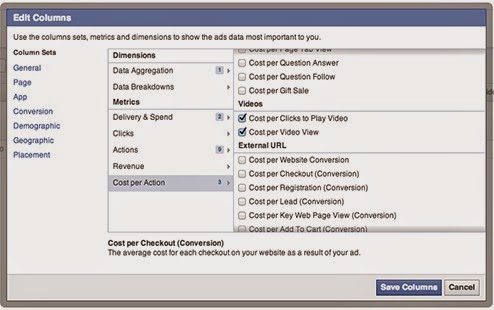
Now you will need to click on “Edit Columns” and then you will be bale to get new metric option  within the action section easily.

New Video Metrics in Ad Reports image photo


The features or options of new columns includes:
Clicks to play the clips
Views

Average duration of video viewed

Views to 25 percent
Views to 50 percent
Views to 75 percent
Views to 95 percent

Average percent of video viewed

And within cost per action options you will also find two new metric which includes:
Cost per clicks in order to play
Cost per view

Average percent of video viewed image photo


Do you tried experimenting with Facebook video ads or not? If you have any queries regarding this guide, feel free to ask in comment section.

Meta description: Step by step and full detailed guide about Facebook video ad features objectives, CTA button,audience, metrics etc.Finally thanks for visit our blog and keep it, If you have any suggestion on this article or if you have any quetion on this article then please ask us, We will trying to update your reply as well as soon, 
Read More..

Jumat, 13 Mei 2016

SEO( Search Engine Optimization) is the process of improving your site visibilty on search engines or just getting natural traffic using different SEO technique.  SEO techniques help imrove your website ranking on to serach engines, imrove your web traffic and ranking.
Here are some techniques that every website owner should try.


                                        The Right Keywords


You must know which type of keywords & phrases people are searching online. However, you must also make sure that your chosen keywords are the ones that describe your company the best.

                                 SEO Optimized Content


Search engine spiders use the content present on your site in order to decide its ranking. Hence, its crucial that you make sure all your keywords are used in a proper manner. Also, you must remember that your website has 2 main objectives, the first one in to attract the search engines & the second one is to engage the reader. With a blog, you are able to update the content on your site regularly and attract lots of visitors.

                                              Descriptive Page Titles


The title of your web page is amongst the most critical things which search engines use for finding your website. You must also remember that titles are not only seen by the search spiders, but they are seen by the visitors on your site as well. Do not overload the title with a bunch of keywords. It would be much better if you focus on the ones which are really crucial to represent the content.

                      Keyword Rich Meta Description and Tags


Meta tags are present at the top side of your web page code. These tags are also one important component which help search engines locate your site. Make sure you accompany these tags with the right Meta description.

Although search engines are not paying a big attention towards the keyword tags, still there isn’t any harm if you put 5 to 6 keywords within the tag section of your website.

                                                     Inbound links play their role


The quality as well as the quantity of the inbound links are critical to your website ranking. There are a number of ways for increasing the incoming links towards your site. A few of these are posting valuable comments on the blogs relevant to the content of your site, posting articles, using social media websites, contacting others to create a link towards your site, etc.

Read More..

Senin, 09 Mei 2016

How Facebook Makes Money From Users or by the likes or selling ad spaces, There are many ways for earning, It can earn by boosting post, Boost pages, by supporting your business, You know Facebook is the one of most favorite social networking site which popular all around the world. You know every site on internet working for earning money, You can also Make money by Facebook if are you know completely this social site, Its getting biggest amount of net advertisement, In this article we are trying to share some way which give high amount to this social site. So all webmasters trying to earn money from net, for they are hardworking, You know advertisement takes a big amount of make dollars on online. Then talking ahead and get more information about this.

How Facebook makes money from Users

If you have a website and you wanna earn from this, then you must need more traffic for more make money, Without traffic you can earn, All advertising sites like Google Adsense, Buysellads, Info-link, Chitika, Yahoo networks all need hugs traffic for earning so fb also need this, but you know Facebook has biggest Active user, Its most users always login their account. And also its user comes from world wide, So its also the biggest social site which have worldwide active user, Its very helping to make money to this social networking site.


Dont Miss - How To Increase Facebook Page Likes 2014 Free


How Facebook Makes Money image photo

Facebook is against to Google for making money

Facebook start  March 1997 and Google start September 1997, Both have different way for earn, You fb is limited social site, but Google spread by many ways, There are many products of Google like, App store, Blogger, Orkut, Google plus also (Social networking site like fb), But Facebook earn biggest amount of net which have only social site services, and Google had many products but fb against Google on to earn money field.


Visit For - Facebook Addiction symptoms on young Generation


How Facebook makes money from the likes

Facebook is the biggest platform for marketing your product online, So grow up your business online using this social site you must need a platform to share your business updates, For this you must a page, Using this you can update your product information and others, To get more visitors you page must need more likes, If you wanna more like with fasted than you can use its premium service, Using this it will boost your post and you will get likes to faster and fb will get money.

How Facebook makes money from ads

Its chief source of fb earning, Fb makes money usually from this way, You know that this social networking site is world wide so its biggest benefit for this, For this world wide advertiser interested to advertise here, Its also a have big traffic of active user so its earn more, Using this this social site is growing to faster because dollars is not issue for grow up fb,


Dont Miss - Top Best Facebook marketing strategy for Businesses
How Facebook Makes Money image photo


How Facebook makes money from Zynga

Facebook also making money from Zynga, revenue, Zynga advertises, how does Zynga make money So Zynga also big source and there are also many sources like games and surveys too for this. Finally, I wanna tell you there are many ways to make money for this social site, Finally, I think its clear that How to Facebook makes by users, likes, by ads and by Zynga. Thanks for visiting this fb blog, If you have any question on this article then please comment below or you can suggest using your lines by sending mails. Thanks for visiting our blog and keep it for more articles and tutorial on this social site.
Read More..

Sabtu, 07 Mei 2016

Facebook Ad Clicks vs website Ad Clicks Difference most people doesnt know, People dont about  about CPC and CPC of Facebook with website,  After sharing on How Should Pay For My Facebook Ads oCPM, CPM or CPC today we are talking about this, What Facebook is well known and best platform for promoting business online and products as well.  Most of the advertisers are advertising on Facebook in order to get targeted audience for their products or business. Also, most of the advertisers think that through CTR and CPC clicks they are tracking clicks on their websites, but they are wrong. In this article we are going to discuss about Facebook ad clicks vs website clicks and difference about both of these two which you should need to know.

Dont Miss - Know Which Facebook Ads Working Best with Google Analytics URL Builder

Difference between Website vs Facebook Ad Clicks image photo


The Facebook Ad “Click”

Within the Ads Manager, Facebook provides various basic results which depends upon how you have optimized your campaign. Such type of typical report will  provide you the results for clicks and click through rates just like this one mentioned in screenshot given below:

Dont Miss - How To Get More From Boost Post of Facebook with Target


Difference between Website vs Facebook Ad Clicks image photo


You will need to understand the number report is total number of clicks received by ad. If you have shared some kind of link which includes clicks on that link. You need to know that it also contains other things like


  • Post comments
  • Post likes
  • Page Likes
  • Post shares

And many more other things. If you are tracking the success of ad which is driving good number of visitors or traffic towards your website or blog by focusing on the  clicks or CPC or CTR then you are over reporting your own success.

The website Click

Now if you want to optimize for the website clicks , Facebook will then automatically provides you details about the number of clicks specific ad generated within the ads manager report easily.

Dont Miss - How To Set Up Website Conversions Ad Facebook Advertising Guide


But if you are looking for optimization of something other than this like post engagement on Facebook, then Facebook will not been able to provide you these numbers in Ads Manager which seems to confusion for most of the advertisers or business person on Facebook.

Don’t Focus on Click, CTR and Clicks

Now when report the results of your advertisement means to drive good number of traffic or visitors from Facebook to your website or blog, this can be considered as best example why you should need to focus or depend on metrics like CPC, CTR and clicks etc. Also, you are not providing the real picture of clear picture  of the traffic your are bringing to your website or blog for increasing blog or website audience.

Clicks: It includes many other clicks which are not websites clicks mainly if your ads was appearning in the News feed.

CPC: It is focused on cost per click which shows about how many clicks which are not website clicks at all.

CTR: It shows the percent of total clicks and total impressions. Again, many other clicks are included into this kind of matric as well.


Now you don’t need to think that these type of matrics seems to be worthless, but you should need to provide an accurate picture when providing the website traffic details. Also focus on two important thing:

Website Clicks

Cost per Website Click

If these options are not coming under main ads manager report, you need to make sure that you have created custom ads report to select those metrics.

Now I hope you have got good knowledge about the main differences between clicks and website clicks and other metrics as well. If you have any queries regards this guide, feel free to ask in comments section.

Read More..

Rabu, 04 Mei 2016

Download videos from Facebook is not hard, but many people dont know about How to download videos from Facebook in computer and in mobile phone or on android mobile, in Last article we was share on How to Download Facebook video without Any Software 2014, Now we are updating that with more information. Its not hard but many new friends are not knowing about this, This social site always trying to share something best feature for there users, When this social site was start its give only some feature like text updating, pictures sharing, But after time to time its including more features for make its something more attractive for there users, Video sharing also a useful feature of this social site, Lets know more about Facebook video sharing.

Dont Miss  - How to Share Upload Mp3 Music on facebook

How to Download Facebook video image photo

How to Upload Videos On Facebook


Before going deep in article i wanna share some basic thing or method for upload a clip on Facebook, its no more difficult, Its similar like a picture share, Open your Facebook homepage, and click on Add photo/video, then you will see upload, Just choose your clip by double click on them, its done, It will take some time which depends on clip size, For more information you can visit our below complete article on this.


Dont Miss - How to upload a video to Facebook

How Tag Facebook video with your Friends

If are you thinking that i am losting topic than i wanna say you that i am clearing some basic thing which people dont know about that, If you wanna tag your favorite clips with your friends, than you can do it it with our simple tricks, Its same like image or picture tag, But its  very important for get more likes on your special movement clip and also important for give information or presents of your clip on Facebook, If you wanna know about this than visit our complete tutorial on this topic.


Go for - How to tag video on Facebook Using Mobile and Computer


Video Tutorial For Download Facebook Videos


Friends we are trying to share all steps with helpful screen shot, If you enable to follow our this method you can follow us, our video tutorial also, Using this you can do its very simple because its no more hard. Than visit our YouTube channel and download or watch this Tutorial and do it

YouTube Tutorial


How to download videos from Facebook on PC and Mobile 

Lets come to point, We are always trying share all method for both screens, Means if you will explore our blog you will find that we are trying to share always complete tutorial for mobile phone and computer, Now days most fb user using mobile phones, So they need this method for their mobile phone also, I wanna tell you that you can this trick for your mobile phone, Android phone, iPad, iPhone and window mobile also,

Lets Download videos from Facebook 2014


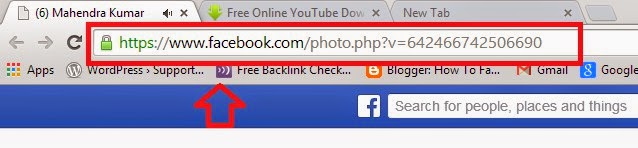
  • First, you Must Go to That Video Page.


  • Now Copy there URL link.


how to download videos from Facebook image photo

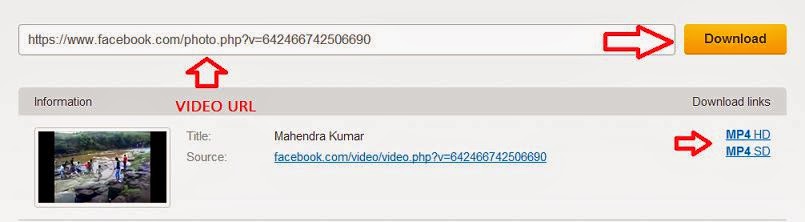
  • Now Go to en.savefrom.net 

  • Now paste your  complete URL there.

  • Now you Click to download.


how to download videos from Facebook image photo


  • You will see many Format 3gp mp4.

  • Just click on any format which one you wanna download.

  • Now its done its work in all screens.


Some lines for this

This is simple tricks, There are many sites using that you can download Facebook video so easily, If you have any suggestion on This article you can comment below, You can share this article with your friends may be they also need this, If you like this article then comment below to say thanks, Thanks for, visit our blog and keep its for more tips and tricks on this social site, You can also request us for any new tutorial on this social site.
Read More..

Sabtu, 30 April 2016

How To Set Up A Website Conversions Ad many friends dont know about this  Facebook Advertising Guide, After sharing on Facebook Analytics Free Tool and  What is Facebook Insights and How to use  Guide and  today we are giving you complate guide series of Facebook advertising. As most of you guys know that Facebook is well known social networking website which is used by business persons in order to promote their business. Such people get more clients or promoting their business through Facebook advertising. So in this article we are going to talk how to setup a website conversion ad easily.

Setting up conversion tracking

The best type which seems to be great is considered as “Conversion Tracking”. Conversion tracking allows these people to optimize their advertisements for other people who will take specific action on your blog or website or landing page.

Dont Miss - How to Submit My Facebook Page for Verification For Logo

 Set Up Website Conversions Ad Facebook Advertising Guide image photo

Type of Product/Business Conversions

Such type of specific actions may be filling out specific form on your website or allowing Facebook people to join your mail listing or to buy any kind of specific product which you are promoting. The best thing is that Facebook will only target these ads for all those people who already have take action for that particular stuff which you are promoting through Facebook ads such as those people who have subscribed to a specific email list or those specific people which have bought products in the past.

Dont Miss - How To Do Marketing on Facebook For Free

The main thing for measuring these conversions, you will need to setup tracking pixel within Facebook and then you will need to add it within <head></head>  section of that particular web page on your website or which you want to  be tracked or for the page from which you want to get conversion information easily by tracking.
Such page can by thank you for buying this product or may be about page or may be thanks for subscribing or may be some kind of specific landing page which is hidden on your website or blog. The video mentioned below will guide you how to set up a tracking pixel for specific page.
(video code)

Step to step Guide on Setup Pixel in Your Site for Track


  • First you must login with your faceboook Account.


  • Now on upper right corner, click on setting gear and scroll down


How To Set Up Website Conversions Ad Facebook Advertising image photo


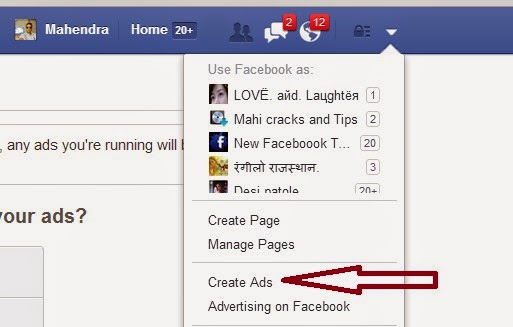
  • After scroll down you will see Create ads option just click on Create ads.


Website Conversions Ad Facebook Advertising image photo


  • Now just click on website conversation, Then you will see a box.


  • Now just fill your site and choose categoty Key web Page Views.


Website Conversions Ad Facebook Advertising image photo


  • After choose a Category name just give a any name and click on  create Pixel.


  • Now just click on I can add the pixel to my website


  • After this you will see codes just add it on <head></head>  section.


Dont Miss - How To Invite all friends on Facebook event in one click Chrome

Video Tutorial


How To Track Conversions with a Tricks Pixel


Setting up a tracking pixel is a little bit tricky method. In the above is clearly shown about the setting up process and ad created. Mainly genesis framework is used on that particular website mentioned in the video which provide an opportunity by default to add code to the header section of individual pages on WordPress websites or blogs.  All we need to do is to scroll down below the page or page which we are creating and there is a box in which we will be going to add code. Have a look at this image mentioned below:

If you are using the WordPress platform for such purposes, but not using genesis framework, then you should need to try out “Per page add to head ” plugin which will help the users to perform the same thing.

Setting up conversion tracking in google analytics

If you are not using WordPress platform or don’t want to mess with the code on your blog or website then you should need to forward that particular code to your developer or you can also use a regular website  ad and also can use your own tracking code. The main thing which you will loose will be Facebook targeting for your business or product, etc but still  you will be able to measure conversions in Google analytics easily.

I hope you liked this Facebook Advertising informative guide on how to setup a website conversions ad. If you have any suggestion or question regards this guide, feel free to ask in comments section. For more Facebook Advertising Guide keep visit.


Read More..

Rabu, 27 April 2016

Increase Blog website Traffic from Facebook is best trick for a website which is recently started, Today we are sharing with you some important tips and tricks for get big percentage of traffic using Facebook account and page, which is How to get Blog site Traffic from Facebook,  Every buddy know that Facebook is the best place for get high traffic without hard work, here you can grab targeted traffic using many features of this social site, Now Google is  very advance also all developer to advance so competition is so increased, 

So every one wanna use easy tips for get high traffic using social sites like Facebook, twitter, Google plus and many more, I have some ideas for you using that you can use them for better seo, All these traffic which we will get using this social account also safe according to Alexa rank and Google Adsense so use its freely.

Why You must Get Traffic Using Facebook For your Website or Blog


Actually, many people  know more try on social sites, Because most people dont know that we can get 20% traffic using this social site, Few months be before we also not trying on this, But after using some tool we get a hug blog traffic using  this social site, In Alexa scan report, we note that its give us, very supportive blog traffic also it can help in Increase Alexa Rank, You can see our blog Report in below image,

Dont Miss - How to get 20,000 Facebook Page Likes In a Week Free

get Increase Blog website Traffic from Facebook image photo

Top Best Way For Increase  Blog Site Traffic Using Social site 

Getting Blog Traffic using Facebook its something different, Get Page view for your blog is possible using three ways, One is the best ways is get an audience by search engine like Google, Bing, Yahoo or any others, and second by Social media, and last is getting direct traffic,  Big website like  twitter is getting  90% traffic by direct,  But if are you new then getting Site traffic using social sites is best ways for newbie. It can support your site for good traffic without no more work.


get Increase Blog website Traffic from Facebook image photo


Dont Miss - How fix Facebook Showing Wrong Thumbnail Image When Share Blogger Post


Killer Tricks To get site  Traffic pageview Though Facebook

There are many tricks for getting a blog or website traffic using social site, but, I am giving you a really so killer trick for this, Juts create a Page, and Group, Get likes on your page and add more friends in your Group Then, Just  share your update using DLVR.IT, It will automatically; share your blog blog on your group, Accounts and on page, You  can connect more accounts and you can get more pageview daily, Its very fast your update will share on your accounts in hour.


get Increase Blog website Traffic from Facebook image photo


Visit For - Tricks for Add Facebook Friends in Google Plus Circles

How to get Increase Blog website Traffic from Facebook


Its a best way and also the professional way to get preview for your blog, First you must create a better page, If you are using a page for your site or blog, You must add a Facebook like a box in your  blogger or you can use a Facebook popup Like box its give you more likes to. When any person which  like your page he will connect with your site updates, If he/she will like  your sites any article that  person surely visit your blog.


Visit For - How to Add Facebook Comments System in Blogger


How To Get Traffic Using Facebook Personal account

Getting Big Traffic from Your Facebook personal account also best way, Just connect your Facebook account using dlvr.it, and share your site updates on many accounts, You can create more account, Just make five thousand friends, If you have big amount of active friends than it will also give you more page view, So for this you must always try to get connected more peoples.

How To get Big Traffic using a Facebook Group For Your Blog and Site


No More people try this trick, but i think as my knowledge and e experience Facebook group also a better way to get a big amount page view of your site,  First you must create a Facebook group on your site name, Our Facebook Group name is New Facebook Tips Tricks. Now add your all friends in your group and you can get also help in getting friends in your group with your friends. too.  Just share your updates there and get positive re result.


Final words

This is a our personal experience, You can use this for better SEO,  If are you new it will help you for the increase URL rank, its also better and supportive way to increase your page rank, Because social sharing is the most effective way to get or increase page rank, If you have any question about this article please comment below, We will reply as well as soon,
Read More..

What is helpjet.net  all about?
                            It is  a website created to help computer user in updating their firm wares and drivers .PC files can be downloaded directly on the website.

How to find a driver or Firmware
So how to you proceed to get a driver updated?
 Method one :From the homepage


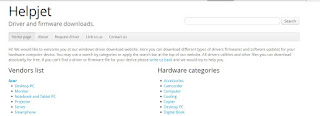
As seen on the screen shot, above, you can select you software from a vendor  list and other feature directly on the home page.
Method two: Using the Request driver tab
To use this method, all you have to do is click on the request driver tab and  enter the following information.

Name:
Email:
Device model and vendor:
Problem description:


Method Three: Using the Search Bar                                                    


Type a key word of the search bar, for example hp drivers.
A list of drivers will be displayed from which you can select your desired driver.
If this is not the case,Click on "Driver Rebot Sofware"  as seen on the screen shot below.
 If this does not still work, then you can contact helpjet.com. I believe you will come back to say Thanks to helpjet.com


Read More..