How To Set Up A Website Conversions Ad many friends dont know about this Facebook Advertising Guide, After sharing on Facebook Analytics Free Tool and What is Facebook Insights and How to use Guide and today we are giving you complate guide series of Facebook advertising. As most of you guys know that Facebook is well known social networking website which is used by business persons in order to promote their business. Such people get more clients or promoting their business through Facebook advertising. So in this article we are going to talk how to setup a website conversion ad easily.
The main thing for measuring these conversions, you will need to setup tracking pixel within Facebook and then you will need to add it within <head></head> section of that particular web page on your website or which you want to be tracked or for the page from which you want to get conversion information easily by tracking.
Such page can by thank you for buying this product or may be about page or may be thanks for subscribing or may be some kind of specific landing page which is hidden on your website or blog. The video mentioned below will guide you how to set up a tracking pixel for specific page.
(video code)


Setting up a tracking pixel is a little bit tricky method. In the above is clearly shown about the setting up process and ad created. Mainly genesis framework is used on that particular website mentioned in the video which provide an opportunity by default to add code to the header section of individual pages on WordPress websites or blogs. All we need to do is to scroll down below the page or page which we are creating and there is a box in which we will be going to add code. Have a look at this image mentioned below:
If you are using the WordPress platform for such purposes, but not using genesis framework, then you should need to try out “Per page add to head ” plugin which will help the users to perform the same thing.
I hope you liked this Facebook Advertising informative guide on how to setup a website conversions ad. If you have any suggestion or question regards this guide, feel free to ask in comments section. For more Facebook Advertising Guide keep visit.
Setting up conversion tracking
The best type which seems to be great is considered as “Conversion Tracking”. Conversion tracking allows these people to optimize their advertisements for other people who will take specific action on your blog or website or landing page.Dont Miss - How to Submit My Facebook Page for Verification For Logo
Type of Product/Business Conversions
Such type of specific actions may be filling out specific form on your website or allowing Facebook people to join your mail listing or to buy any kind of specific product which you are promoting. The best thing is that Facebook will only target these ads for all those people who already have take action for that particular stuff which you are promoting through Facebook ads such as those people who have subscribed to a specific email list or those specific people which have bought products in the past.Dont Miss - How To Do Marketing on Facebook For Free
The main thing for measuring these conversions, you will need to setup tracking pixel within Facebook and then you will need to add it within <head></head> section of that particular web page on your website or which you want to be tracked or for the page from which you want to get conversion information easily by tracking.
Such page can by thank you for buying this product or may be about page or may be thanks for subscribing or may be some kind of specific landing page which is hidden on your website or blog. The video mentioned below will guide you how to set up a tracking pixel for specific page.
(video code)
Step to step Guide on Setup Pixel in Your Site for Track
- First you must login with your faceboook Account.
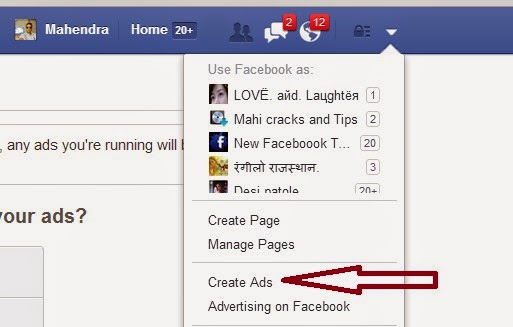
- Now on upper right corner, click on setting gear and scroll down
- After scroll down you will see Create ads option just click on Create ads.
- Now just click on website conversation, Then you will see a box.
- Now just fill your site and choose categoty Key web Page Views.
- After choose a Category name just give a any name and click on create Pixel.
- Now just click on I can add the pixel to my website
- After this you will see codes just add it on <head></head> section.
Dont Miss - How To Invite all friends on Facebook event in one click Chrome
Video Tutorial
How To Track Conversions with a Tricks Pixel
Setting up a tracking pixel is a little bit tricky method. In the above is clearly shown about the setting up process and ad created. Mainly genesis framework is used on that particular website mentioned in the video which provide an opportunity by default to add code to the header section of individual pages on WordPress websites or blogs. All we need to do is to scroll down below the page or page which we are creating and there is a box in which we will be going to add code. Have a look at this image mentioned below:
If you are using the WordPress platform for such purposes, but not using genesis framework, then you should need to try out “Per page add to head ” plugin which will help the users to perform the same thing.
Setting up conversion tracking in google analytics
If you are not using WordPress platform or don’t want to mess with the code on your blog or website then you should need to forward that particular code to your developer or you can also use a regular website ad and also can use your own tracking code. The main thing which you will loose will be Facebook targeting for your business or product, etc but still you will be able to measure conversions in Google analytics easily.I hope you liked this Facebook Advertising informative guide on how to setup a website conversions ad. If you have any suggestion or question regards this guide, feel free to ask in comments section. For more Facebook Advertising Guide keep visit.


