Tampilkan postingan dengan label with. Tampilkan semua postingan

Kamis, 26 Mei 2016

Add Stickers on Facebook comments now very easy, Now you can post Facebook funny stickers on any comment, Now you can post stickers on Comments using Android, Mobile phone window mobile, Computer and any mobile and computer browser, Its making more attractive to Facebook also help you to share your feeling by stickers. You can also see older post for New Funny love Facebook chat sticker, For install new stickers.

As you know that Facebook is always updating website, On this platform you will see that, Day by day you are seeing many new feature for its users, Its yearly updating timeline, page timeline, many new privacy and security updates, hash tag and more others. You know most updates are very liked by peoples. So lets know this new update of this social site and get it.

Dont Miss - How to Earn Money Using Facebook Without Invest

How To Add or Post Stickers on Facebook comments image photo

Can I Post or share Stickers Directly on Facebook Friends Comments 

Before this change we can share picture and photos on comments by uploading through your mobile or computer, This take more time and also not easy very time. For this if you have not any emotions in your mobile or pc then you cant do. But now its more easy.

Similar chat  method now you can directly share your emotion and feeling by chat emotions, Most attractive thing its posting by one click, So now you can enjoy this social networking site with more funny and attractive comments emotions. lets know step to step method for this.

Facebook Comments Tools You may like 

If you need more awesome features or tips abd tricks of this social networking site than you can also visit our many tools, Which are giving you many type comments and status update generators, They will help you to share something different text from others, So for this just visit - Best Facebook Tools For Page Chat Timeline and For All

How to Post Stickers on Facebook Comments

This is not hard also very simple, Its similar like post image or photos on comments. Before this if you wanna post any Stickers on a Facebook comments, Then first you need to download them in your device drive, After then you can upload it, But now this social site make it more easy. now you can share sticker similar like chat means, You can live sticker in a click just follow.

- First you Choose any post where you wanna share Sticker.

- Then Click on Emotion button near by camera Icon.
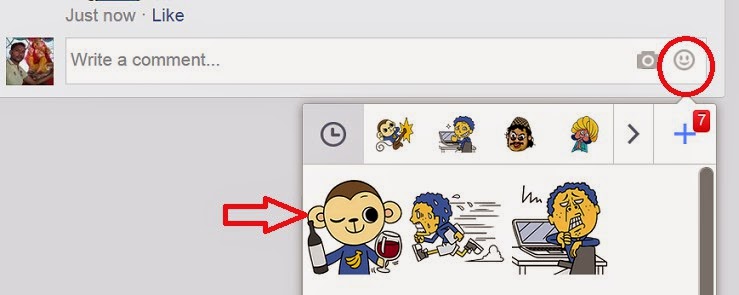
How To Add or Post Stickers on Facebook comments image photo

- After Then just select any one as your Choice and click on it.

- Now its done, You can see sticker on comment.

Final words on Funny Stickers News

Its recently launched news, So in this post we are not more information of how to stuff guide, If you find any new information of this, Or you need any how to guide on Stickers download, new install, or any other then ask us, We will share your need as well as soon, If you think that this article useful for your friends, So please share this useful News of this social networking site with your friends,  
Read More..

Selasa, 24 Mei 2016


For orange Cameroon(Facebook only for one week)

Recharge your mobile phone with 300XAF,
Input the ip 186.26.180.253 port 8080
Use  m.facebook.com in as proxy server
  Happy surfing for orange subscribers.

 Another Ip here for orange subsribers using german servers webtogo.de
Apn: orangecmgprs
ip:185.26.180.70
port:80
proxyserver: www.webtogo.de

For MTN Cameroon
IP1 address as follows: 141.000.010.190
orIP 141.000.010.111
 Port: 80
Proxy server: www. mtn.cm
Bonus ip for MTN
Ip 185.26.180.70 port 80
Server: mtncameroon.net
For Nexttel,
Server http: funclip.nexttel.cm
Socket server: funclip.nexttel.cm
And save. This will work well for version 4.2
If you will like to use an ip, try this
185.26.180.21
185.26.180.16
And port 443.
Don’t forget to leave your feedback as comments. Please no phone calls for free internet. Leave your comments and I will give your solution.
Read More..

Senin, 23 Mei 2016

Facebook Tutorial with Step To Steps for all types method and tricks may be great collection if you will see any where on the net, We also have some useful tips and tricks method of this social site, You can also enjoy it. today we are sharing our best working Facebook Tutorial with Step To Steps for All how to stuffs, If you wanna enjoy social sites than first you must know there all Tutorial on how to,

 If you will done all how to stuffs than you will sure can enjoy its many features, Actually Facebook is the biggest website on the internet world which proving you many features of social site also online advertisement and business promotion. So you must know its many features which are provided by us with complete steps and also with video tutorials.


Facebook, YouTube Video Tutorials

We are always trying to share with your best method, We have also a Big and most useful YouTube Tutorials channel also, On our YouTube channel we are providing some mobile tips and tricks and full guidance of Facebook, How to stuffs method,  In your video we share all steps with notepad guide, also zooming on special steps and brief discretion on complicate steps, You can enjoy our YouTube chancel and enjoy our Facebook Video Tutorials also.


Just Go our YouTube Channel - YouTube Mahendra Meghwal

Facebook Tutorial image picture


Our Best Tutorial on Facebook with How to Guide

We have big collection of Facebook Tutorials, We are dividing this collection in three parts One is How To Guide, Second is Tips and Tricks and final Third Related to Scripts and codes, Actually we were posted all best and most needs of how to guide, If you need any Method, which we are not included in our previous article, You can ask for that, We will always try to provide our fans need, Than lest enjoy our big collection of this social sites new and old working guide.

Best Tutorials of Facebook 2014


This is a big social site, There are thousand How to stuffs related to this social site, We also posted many Tutorials on our blog, You can explore for more How to stuffs and best working step by step tutorials, In this post we are giving you only six, Which is visitors choice, Just enjoy our some article and keep exploring for more.


Facebook Tutorial image picture


Official Change Facebook Page Name after 200 likes 2014


How To Add Five Star Ratings System in Facebook Page


How To Post Share Animated Gif Picture On fb 2014


How to Bypass Facebook photo tag verification 2014 New


How To Boost Facebook Page Get Likes Free Fast more 2014


How to get Make 5000 friends on fb Fast in One Day 2014


Final Words for all Tutorial  of facebook


Actually, we a have a very big collection of Facebook Tools, But this article or post is very small, So we cant provide all articles in one article, These are our sites best articles which most liked about our blog, If you see any new tips and tricks on this social site you can comment below, We will try to share on our next post if possible, You can share this article with your friends may be they also like this or need this, Please share this article and comment below to say thanks, Thanks for visit our blog and keep it for more tips and tricks and working tutorials on this social site.


Read More..
How to Run a Facebook competitions with right Rules or without breaking rules guide with apps and without apps today we are sharing with you., Last we was also How to run a Facebook contest for free For Page and Timeline,  As you know that social sites are now not limited like photo, video sharing or chat with friends, Now its a biggest part of many things like marketing, business, surveys. Now you can use this social sharing site for many proposes, You can contest for capitations, You can do surveys for get betters results of people thinking. Then lets know more about this and enjoy.

How to Run Successful Facebook competition with the Rules 

Most of the people who have started their business online or promoting their products on the internet must be using Facebook for getting targeted customers/audience for their business or products. As Facebook is one of the top most and popular social networking website which is used by millions of active users on a daily basis. Most of the people, which are active on Facebook gets interested in online products and then decide to buy them. In this article, we are going to talk on how to run Facebook competitions with rule a complete guide.

Dont Miss - Facebook Video Ad Features CTA Button, Audience, Metrics

How to Run a Facebook competitions with Rules image photo

How to run a competition on Facebook Page

Now using Facebook is considered as one of the best method of building awareness about specific stuff on the internet among internet users or promotions of business. You can grow your business larger and larger among internet users through advertisements on Facebook in order to beat your competitors easily.
But do you have any idea or guides line about competitions and promotions on Facebook? In this article, we are going to share an awesome guide on how to promote your online business on Facebook without breaking any kind of rules easily.

Dont Miss - How Should Pay For My Facebook Ads oCPM or CPC

How to Run a Facebook competitions with Rules image photo

Facebook Contest Ideas For  Successful 

The main thing that you will need to keep in mind and be careful about how you are going to run promotions and competitions. There are some kind of detailed terms and conditions which you will need to follow, and if you will break them or not follow then you business might be in trouble/risk and some serious action will be taken against your business.
Some of the terms and conditions of  about promotions and competitions are mentioned below:

 You can’t select random winner from your Fans in order to receive the prize.
Asking your fans to vote for some specific post or picture is not allowed which appears on your Facebook page.
Also you are not allowed to use fb for informing the specific person that he/she have won the prize.

Dont Miss - How To Get More From Boost Post of Facebook with Target

So in order to fully follow these kinds of rules, you will then need to have a third party app on fb platform like Wildfire. It will be good option if you are having larger business but if you are running some kind of small business then you should need to think about some other best way.
Various other Fb pages can also be found who are breaking or not following the FB rules, think about your business, do you really want to lose your own business page and then want to be keeping connected with your fans?

Successful Facebook contests

The best solution for such purposes will be that you will then need to start promotion or competition on your website or blog in order to have a complete control over it. Also having an optimized and attractive landing page helps to increase more sales. As long as you are not asking the people about the main aim of your advertisement or promotion you are not breaking any kind of rules.

Dont Miss - Top 10 Most Liked Facebook Pages 2014 in the World

The best thing about this method is that it helps you to drive more audience and more visitors to your blog or website which will be helpful in getting more conversions. If you have any queries regards this guide, feel free to ask in comments section. Visit for more about this socila networking site. If you have any question on comments one page, comments on tiemline, comments on picture then ask us, We will trying to solve yoour issues, Thanks.

Read More..

Minggu, 22 Mei 2016

Blogger provides an option to set up a custom domain to point to your blog. However, There is no common way that this can be done. It depends on where you bought your domain domain.
Many people buy domain names on godaddy, for different reason. We will go through a step by step tutorial on how this process is done.

I have read some tutorials on setting up a custom domain on blogger with +GoDaddy . I noticed that the screen shots are not typical of the current godaddy.com design. This screen shots here are typical of what godaddy.com looks like ,September 2015.

In order to apply this tutorial to you blog, you must have the following
1. a blog hosted on blogger
2. a domain name registered on godaddy.com
          When we talk of setting up a custom domain on blogger, we mean using you own domain name to point to your blog not the way given to you by blogger.

There are two ways this can be done:
 I. on  subdomain for example(sms.ransbiz.com)
You might decide to use a subdomain if you want use your domain name on another website.
For example an oil company that  has a website might want to use blogger to write articles about their service.
if the domain name for the company website is say  ransbiz.com,
the company can choose a subdomain name   blog.ransbiz.com to point to their blog on blogger.

 II. On a top level domain(e.g ransbiz.com)
In this tutorial, i will show you how to set up a top level domain to point to your blogger blog.


 Set up your top Level domain to point to your blog on blogger.
==stetp1
Go to you blogger dashboard==>settings==>basic and click on  set up a third-party url for your blog


 ==STEP2
Enter your domain name (make sure you use www.) and click on save, the following will display on your screen.
You will need the information indicated with the two red lines
==STEP3
Go to your godaddy account and fine your way to my domais tabs ===>Click manage.
If you can  not do it, then follow the screen shot below(Note that there are several ways to do this )
==STEP4

 Click on the domain name you want to use ==> Click on DNS Zone File


Scroll down to where you see CNAME(Alias)


 under host you will see www  already wriiten.
click on the pencil icon to edit. Under point to, type
ghs.google.com(you can remove whatever is written there)
If you cannot find www already typed under Host, Follow the instructions in the next steps. Make sure you have something like this.
                              HOST                                      Point to
                              www                                       ghs.google.com

 ==STEP5
We have used the first CNAME indiacted on step 2
To enter the second CNAME(See second RED line on step 2)

Click on Add Record at the top==>select CNAME as on the screen shot above   and input the following

In the field for host
Copy and paste  info1 (step2)
Also copy and paste info2.googlehosted.com into the point to field.
Click on Finnish when you are done.
make sure you click on save on the red tab.
At this point we have directed our custom domain to a blogger blog. But we will receive errors when someone type your domain name without the www.
STEP6
To enable this, go to add record==>selecet  A (Host) and enter the following IPs.
Host            Point to
@
      216.239.32.21
@
      216.239.34.21
@
      216.239.36.21
@
      216.239.38.21


After entering the first click on add another untill all the 4 IPs are entered.
Then clik on finnish and again click on save changes displayed in Red.
      At this point, return to your blogger and Click on save.
Your will see the domain name displayed.

Click on edit beside the domain name and  Select the box displaying something like this.
 
                         Your can now enjoy your custom domain on blogger.
Have you set up a custom domain with another host? Share with us how easy it was.
Read More..

Sabtu, 21 Mei 2016

How to remove photo tag verification on Facebook easily this trick all trying to get, This trick giving your Facebook account without doing Facebook photo tag verification, Actually many friends cant  get ride on Facebook photo, picture o image tag verification, We also share with you How to Bypass Facebook photo tag verification 2014,  using this you can get your account again but if you dont understand that method properly than you can choose our this method, Actually this is a security issue for disable your Facebook account which need photo tag verification, But its really to hard,  Few month before i was also get same problem but i was done photo tag verification, but after tow days Facebook was disable my account again, After all i choose different method for get ride this problem, by submitting real id you can proof your account.


Why I am seeing Facebook Photo Tag Verification

Many people think that after using real names and real account why Facebook trying to prove their identity, that He/She is a real person, Actually this is a Facebook security system, When Facebook will notice that a person using excessive any feature, Then Facebook system thing that may be its a fake person or other people so its security system automatically catch that person and take it for review, If you will compete right people with right tag then you can get your account. If you cant done verification than your account will not work.


Dont Miss - Why My Facebook Account is Unavailable Disable Delete 2014


how to remove photo tag verification on facebook image photo


Dont Miss - How to find out fake profile Picture on Facebook latest


Some reason which can Avoid picturing tag verification


  • If you will follow some tips and tricks than you will never get it.

  • Some policy and terms of Facebook always follow them.

  • Dont tag a photo to strange people, Than report you.

  • Dont send unwanted friend request to strangers.

  • Dont send unwanted sms to non friends.

  • Dont share bad links on Facebook.

  • Keep same name on Facebook.


Remove Security Check Picture Image Verification on Facebook

Removing Image Verification on Facebook is very easy, If you have limited friends in your Facebook profile, its also easy when you tag picture or photo with only limited friends, But you have a big list of Facebook friends and you are always tagging your images with your friends than its really so hard, So if you cant do that by proofing or giving the right image to write friends tag information than you can choose different method, It will tag 3 to 7 days.


Dont Miss - Submit My Facebook Page for Verification Get Verified Logo


Get your Facebook Account without Photo Tag verification


  • If you cant verify Facebook Photo Tag verification Than you must upload real id.

  • After submitting real identity, they will send your account again.

  • Go to appeal of your Facebook account  Contact to Facebook Page


how to remove photo tag verification on facebook image photo


Final words

This simple trick also working worldwide, If you cant get ride Facebook photo verification, then you can use this trick, As we share with your complete tutorial, but if you get any problem on this article or completing this article you can comment below, We will reply your answer as well as soon, Thanks for visit our blog and keep it for more tips and trick and working tutorials.

Read More..

Kamis, 19 Mei 2016

Facebook Customer Service is better option for get ride on any problem of there active users, Now you can contact to Facebook using there mobile phone number and using your email and live chat, Last past we was also share with you How To Contact Facebook by Phone or Email for Report now we are also updating that article with more active phone number and and emails help line, This really biggest social networking site, There are many issue which appear with its users daily, Facebook is trying to improve there service for make more user friendly, These services are making this social networking site more user friendly because not its also a biggest part of online business promoting platform, So solve peoples issues its must need, If you have any issue related to fb you can contact also. Lets read more about this and enjoy this social networking site without any error.

How can I contact with Facebook developers?

If you are daily or weekly visitor or blog, then you know that we are always trying to share our fan needs, We also like to completes our fan issues and questions for making our blog more user friendly, Many friends asking us that they can contact with Facebook developers? I wanna reply to these all friends by this article or lines, That you can contact to DB developers if you have critical issue and which not solved by you or their answer you are not finding any.  If fb found that you are really having critical issue, then they will surely reply your answer and they will solve it soon as well,

Dont Miss - How to remove Photo tag Verification on Facebook 2014

Facebook Customer Service Number and emails Contacts image photo

What is Customer Care service Number for Facebook

If you have  any issue which you enable to solve by self try than you can contact to Facebook, But its not for all countries, Actually fb is giving different policy and terms for different places users, Mosley its specials services only for USA and UK, Means you can find Facebook Customer Service Number for USA and UK but but there are no one for other counties, But if are you using special features of fb, like Adwords than you can use it customers service every where, Finally its customers service not for all issues, for some issue you can us its phone number and for some issue you can use its emails services.

Some ways to contact to Facebook

If you wanna contact to this social networking site than there are many ways to contact, I am sharing many contact pages for connecting with FB developers, If you have any issue, then click on related links, There you will see complete information for contact forms and numbers for customer services.

Dont Miss - What is Facebook Insights and How to use with Page Guide

Facebook Customer Service Number and emails Contacts image photo


Contact for   Get Disable Fb Account Again.

Contact for Change Facebook Page Name issues.

Contact for report and  any problem from below link.

 https://www.facebook.com/help

Contact for for your Page issue and Advertising issues.

https://www.facebook.com/help/contact/1404538353129437

Another customer services contact page

https://www.facebook.com/help/contact/1404538353129437

Facebook Customer care email and mobile numbers 


Fb email id assigned to disabled fb profiles  appeals@facebook.com

Fb Email Address for any queries about disable or suspended fb accounts

Fb customer care Email Id: info@facebook.com
Or
Fb customer care Email Id : disabled@facebook.com

Email Id: abuse@facebook.com

Worldwide Facebook Contact Number : 6505434800

Fb Toll Free Number in India 1800 258 2590 

Dont Miss -  How to see or Check your fb Page fans Profile


India Head Office of Facebook

Thomson Reuters
# Hi -tech City Main Rd,
Vittal Rao Nagar,
Hyderabad,
Pincode 500081
Andhra Pradesh, 
India

USA Head Office Of  Facebook

Fb, Inc.
# 471 Emerson St.
Palo Alto, CA 94301-1605
United States
Phone:  650 543 4800
Fax:     650 543 4801
Press:   650 5434811

About Facebook support Emails and Phone Numbers

Guys, there are no one specific email address which provided by this social networking site, Actually fb is providing you a contact form, If you have any issue, then you can contact to him, If you have any more information about this article then please ask us by comment below and MSG us, We will try to add your customers care services links and numbers in our article, Thanks for visit our blog and keep it for more latest helpful tutorials and updates of this social site. 
Read More..
Best Facebook status love, hilarious Facebook status, funny Facebook status, cool Facebook status, Facebook status quotes, Facebook status ideas most user need for get More Comments on Facebook Photo, Status Updates Fast, As you know that every social site also know by their updates, People are daily updates status, new and old videos, also pictures but Quotes are most share on every social networking site, Mostly funny Quotes and love Quotes are shared by people.  You know quotes are most popular on social media websites likes Google plus, twitter and also on this platform,  You can also watch that funny quotes and love quotes page also most liked and getting more popularity, So if you wanna yourself as most liked page owner then you will thing about get more like on  Facebook page, But just create a page on best quotes, You will get more likes easily.
Dont Miss - How to Get 1000 Girls Friends Request on Facebook in a Week

Best Facebook status Sites image phtoto

Share Best Facebook status Get More Facebook Likes

If you searching about How to Increase comments and likes on Facebook, then just wait and read our this lines may be you can find more ideas for get more likes. You know that every second we are getting new updates notification, Its also depend of your friends quantity, But we getting more notification. and you know we dont like every things on this social networking site, But if you see something attractive and also more useful and or unique thing then we notice it, Sure if you see something unique then you will like that, So if you wanna more likes on your status updates then you must share something new which can attract your friends, Here we are sharing some best sites which are giving more unique status updates with all category like  Love quotes, Funny quotes,  joke quotes and many just visit and get more information about this.

Dont Miss - Complete Facebook Page Verification Detail with setup to Send 2015

Facebook status Sites image phtoto

How To get More Likes on  Facebook Status Update

As you know know we are always trying to share all about related to this social networking sites, So many friends asking us tips and tricks and also how to guide of this social media site, Our many friends also asking us, they without using any tool, How can they get more likes? Today we are replying to my all friends that people love unique things on every social media sites, So if you will share something new and also more unique then automatically you will get more likes and comments, If are you sharing regularly same things then people getting so boarding and they not like your updates.

Top Sites For Get Love, Funny Facebook status

As you know that Best Facebook status is not one, their are many which we need every day for share, on one post you can get all best love, best funny and other Best Facebook status, So for this today we are decide to share some best sites which can give you world most popular and also new , Just share their collection and get more likes, Most thing of these site that these sites always share something new and most unique update, and you know unique things are most liked every where, Then lets check these sites and get all type best update for your wall, and get more popularity among your friends.

  •   Mystatusi


  •  Silly Updates


  • Desistatus.com (Hindi) 


  • PostRandomonim


  • LovesmsinHindi (Hindi)


  • Status99.com


  • Statusstalker


  • Funny Status.com


  • Facebook Status 123 

YouTube Video


Best Facebook status Final verdict 

Friends, their are many sites which shearing like these type updates, If you will search on Google or on bing then you will find hugs collection of these type sites, But in this article we are adding these types sites which have good Alexa rank and also good page rank, means traffic, alexa and page rank showing popularity these sites,  If you found any new site which also share world best updates and also can use for our fans or also useful for this collection, then just ask us, we will like to update our article for better result. If you have any suggestion on this collection than just ask us for more new Best Facebook status Sites, keep visit our blog.

Read More..