Tampilkan postingan dengan label mail. Tampilkan semua postingan

Senin, 09 Mei 2016

I know that I normally blog about crafting projects, but yesterday I tried the Dry Rub from Croix Valley Foods and just had to share this product with you.  My sister just recently started working with them doing in store demos of their products.  


One of the products she was featuring was the dry rub.  So that customers could really get the taste of the rub and not the food that you would put the rub on when she is doing in store samples they make this oyster cracker mixer.  When I tasted this mix I thought that this would be a great party mix, instead of Chex Mix so I asked her for the recipe.  


2/3 cup canola oil
1 cap full of Croix Valley dry rub

Dump the canola oil and the rub into a large plastic baggie and mix well.

Add one bag of oyster crackers.  Close the bag and shake until it is mixed well  Let sit at least 30 minutes so that everything soaks in.

Enjoy!

Below are the links to Croix Valley Foods, including all of their social media links.  
Tell them Shawn Mosch sent you!


Croix Valley Foods website // Facebook // Twitter // Instagram // Pinterest
Read More..

Senin, 02 Mei 2016

Recently, microsoft updated the email features to give another look for  the free microsoft email users. Eventhough many things still look the same, it is important to know what is new or had been modified.
1. Ad on Right side bar.
In the previous version, there were no ads on the side bar. With the new version, ads are being displayed on the right side bar. Users now have the possibility to use either  ad free outlook(premium about 20 dollars per year) or out look with ad(free). This is a very similar feature on Yahoo Mail.
2. The Setting tabs clearly displayed on the right with sub-settings displayed on a drop down menu. You can also use the suggestion box to send feed back, by clicking the question sign(?) before your profile picture (after settings)
3. No  Facebook contacts for conversion.
Event though this was done earlier, You can only communicate with skype contacts when checking your mails on out look.
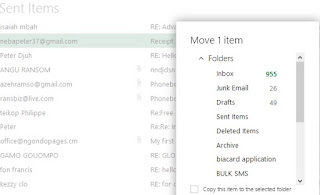
 4. Pop Up when you click on More folders to move an email.

  5. Pin Message option

 In addition to the  flagged option, you can now pin your important messages. Pinned emails will remain at the top.


6. Archive folder.
Instead of pinning emails, you can also move important emails from your inbox  to the archive folder .
To use this feature,
 Go to your inbox==>Right click on the message of interest===>click on archive
 and your message had been kept in a special folder.
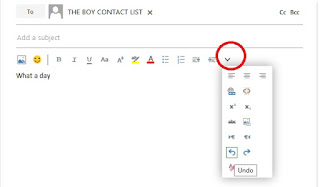
7. Undo Action
The most common undo on Microsoft word is now available in your outlook account.
This help you to get actions you deleted back.
To use this action select the drop down arrow at the left end when you are typing a new message. This new menu got other features like hyperlinking options,table insertion,adding alternate text or image among others.

8. Templates(Ad ins)
With the new outlook , you can create customized messages and save as templates which can be sent to any user any time , By click Ad ins  when typing a new message.

9. The Sweep Feature 

The sweep feature allows you to keep messages for a particular number days,you can also use it to delete messages from  specific users.You can as well keep emails from specific senders for a length of time.This will hepl keep your inbox clean from thousands of unwanted emails .
10.  More features of word
You can now in subscripts and superscripts redo , undo and redo actions, resize images  and more
Do you like the new outlook features?


Read More..

Selasa, 22 Maret 2016

Over the past few days I have received some products from the brands that were at the 2016 CHA Blogger Event I attended.


Since I love things that shimmer and shine, I am really excited about the products!  Metallic surfaces are everywhere!  There is a sampling of the new metallic fabrics from Fairfiield.  


I saw this gold fabric at the show.  It was being used as part of the wreath make and take project at the Ad Tech booth at CHA.  To see that project, just click HERE

I am blown away by the products from Thermoweb!  Look at the beautiful colors of foil!  This is going to be so much fun, since I just did my first foil project this past week.  If you want to see that project just click HERE.


Now that I know how that Thermoweb makes working with foil, I think it is going to become a product I always have to keep in stock in my craft room.


I even got some gold tint paint, along with a couple of other colors . . . and some spray snow.  And dont forget about the coloring book that I got at the event.

Now I need to get my inspiration going so that I can create some fun projects to share with all of you with these goodies!
Read More..