Tampilkan postingan dengan label hide. Tampilkan semua postingan

Rabu, 20 April 2016

How to Hide or Limit Past Facebook status or post is a useful trick for making your previous old post or album or picture make private from other friends. For privacy Facebook updating many features time to time, This feature also very useful for hide unwanted and your useful Facebook albums from by default setting, Using few clicks you can hide or limited you previous or past posts easily, You know privacy is the biggest issue on internet, Every people trying to get strong privacy for there profile or there data, Because you know on internet connected data not safe, Like as on social site privacy is also main thing which people trying to get ride, So if you wanna know about this than just talking ahead and get more information about this and understand better. Then lets try and get more information about this


Why you Need To Hide your Facebook Post and Status

Before share method with you or going to deep in this article i wanna talk about some extra lines and this topic, Actually, every people on this social site trying to get something different privacy setting, This trick only help you hide your older or past Facebook updates, If you wanna show that than its by default Facebook give you, But after some time you wanna hide that then you can choose this trick, As my thinking i am not trying this, Because after share a picture or status after some time hide there are no means, But if you need this you can do it.


Dont Miss - How to Submit My Facebook Page for Verification Get Verified Logo

New Facebook Privacy Settings Guide image picture

All Facebook Privacy setting For New Users

On every social site, privacy setting is the really useful issue for all, Before use this social networking site, you must set up your best or required privacy,  First you must know that Facebook always tries to update their privacy terms, So always dont ignore Facebooks official new updates which are appearing on notification with Facebook logo. Because fb is never trying to harm their privacy so they first update that, If you wanna more about this you can visit our below article fully written on privacy setting.


Dont Miss - New Facebook Privacy Settings Guide Tutorial 2014

Hide Facebook Timeline Walls Past or Old Posts and Updates


  • First you must login with your Facebook account.

  • Now simply click on setting option.


How To Hide Or Limit Old Past Facebook Post Status image photo


  • Now click on privacy setting and see on Who can see my stuff?.

  • Just find Limit past and click on Limit Past Posts.

  • Now simply click on Limit Old Posts.

  • Then you will see a popup Are You Sure You Want to Proceed?

Dont Miss - How To Get New Facebook Post Ideas For More Likes


How To Hide Or Limit Old Past Facebook Post Status image photo


  • Just click on confirming button, you will see the Audience Change Complete popup.


How To Hide Or Limit Old Past Facebook Post Status image photo


  • Now its done, For more help you can visit official link of help center.

Hiding Limit Past Posts on Facebook final words

This is the official method for limit past posts, If you need more privacy setting you can read more articles about Facebook help center, If you need any new privacy setting tutorial related to this social networking site you can suggest us, We will try to share that post in the next article, If you think that this article also useful for your friends then please share this with your friends also, Thanks for visit and keep it for more tips and tricks also working tutorials.

Read More..

Minggu, 10 April 2016

How to see or Check my new Facebook page fans Profile is very easy but most admire dont know about this, But its very useful for if you buy Facebook fans targeted, and also very helpful in target your online business using Facebook, You know time social sites are much affect your business, There are many social sites which earning big money every day, Its main reason is that every business now time connected or affected to social site, So every company trying to promote there business though social site, Just we are talking about Facebook so if you wanna promote your online product using this social site than you must create a page and target your friends, targeted friends your business may grow fast, Means you can target only your customers only, So i think see you new Facebook fans profile may useful for you, Lets talk more about this.

How to See my new Facebook Page Likers Profile or Account 

Recent Facebook changes their Facebook fan page layout, Many people unable to understand this is, That change really useful also showing many demographic data which can more help us in our business, You know that if you will promote your business, Then you must find ours that, which specific place you are getting more likes, You can find out your new likers from Facebook insight also, Actually this no more difficult, But its also basic tips about Facebook users to understand this social networking site. Then lets talk more about and know this.

Dont Miss - How to Submit My Facebook Page for Verification Get Verified Logo

How to see or Check my Facebook Page fans Profile image photo


How to see check who like your page complete list


  • This is no more difficult just follow and do it.

  • First you must login in Your Facebook account,

  • Now simply go to the required page.

  • Now click on Page setting tab.


How to see or Check your Facebook Page fans Profile image photo


  • Now simply click on banned user.


How to see or Check your Facebook Page fans Profile image photo


  • Now scroll Down banned tab and click on People who like this

Dont Miss - What is Facebook Insights and How to use with Page Guide


How to see or Check my Facebook Page fans Profile image photo


Dont Miss - How To buy Facebook likes with Cheapest Price

  • Then you will see a complete list of your fans.

  • You can get more information about your fans using this tab.

Some lines for check page likes accounts

Guys, this is simple method also we share with complete screen shots, If you have any question related to this article, You can ask us, We will try to share your reply as well as soon, If you need any trick or any tutorial related to this social site you can ask us, We will try to post your need in next few days, If you think that this article may be useful for your friends then please share this with your friends.
Read More..

Rabu, 16 Maret 2016


The android operating system is one of the most popular operating system used on most devices.
You can use this option to: enable debugging options, get bug reports on your devices, flash images, root your device, details on screen among others. This option is design for developers, but can be used by non-developers. Funny!! right? Grand pa doesn’t need to use developer option. . Read rooting here.
STEP one
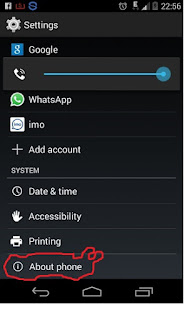
Go to settings
Step two

 Click on ‘’About phone’’ (Usually the last option on the setting tab)


Step three
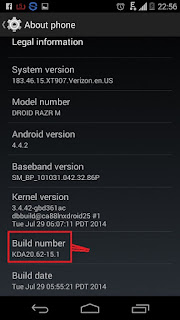
Search for  ‘’Build number’’ . Click on that number seven times.
Return to your home screen .


 Results


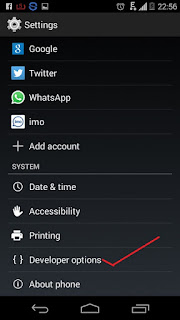
Developer option is now enabled on your phone on the settings menu.
What if I can’t find it? Just repeat the process and tap build number more than 7times.


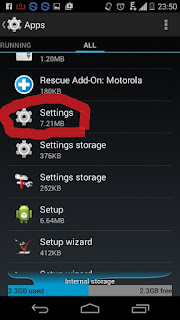
 You can also hide the developer option as follows.
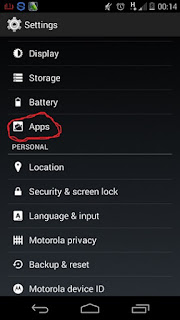
==On your phone menu, select   settings


==Click on Apps


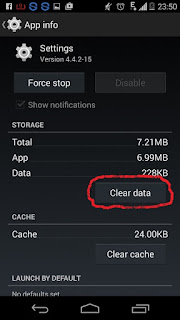
==Open the settings app


==Click on clear data.
Developer option now gone!!!

Read More..